Garden of Witches Controls
Mouse aiming is the 1.0 default — here is how every scheme maps onto dash, Charge, and the four skill slots.
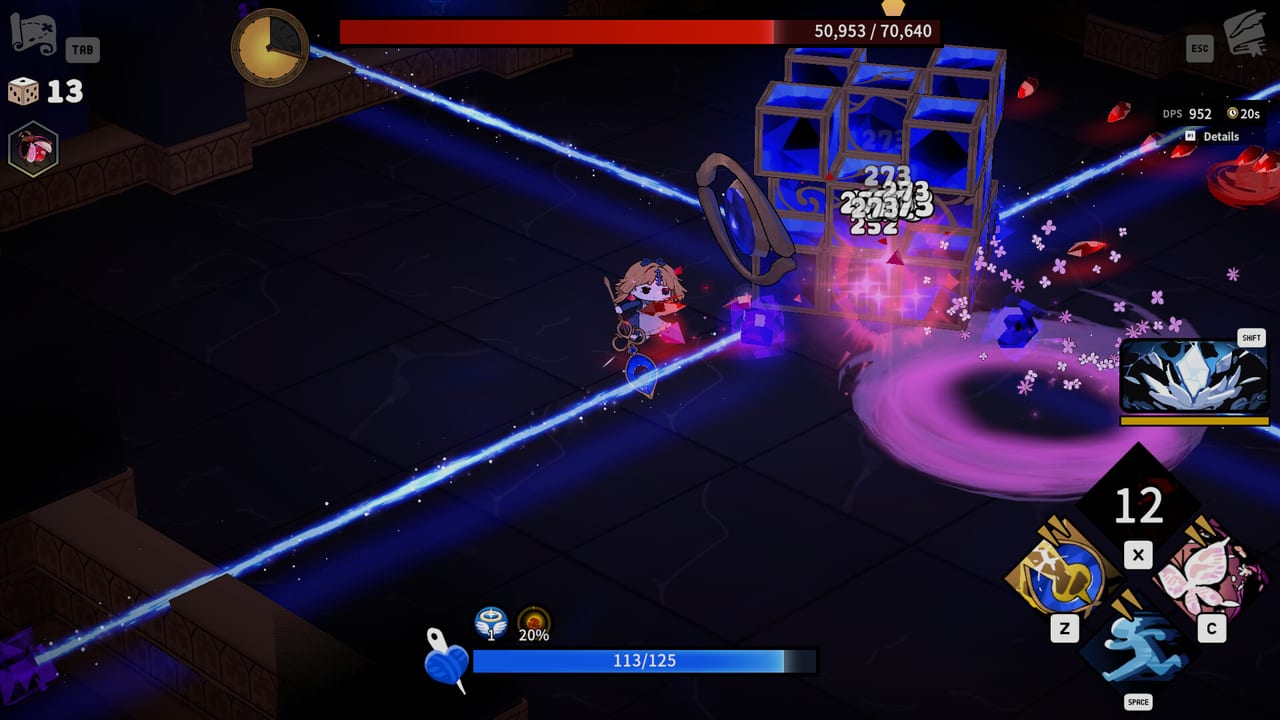
Garden of Witches shipped keyboard-only plus full Xbox and PlayStation support in Early Access. The number-one request during that year was mouse aiming. Version 1.0 made a dedicated keyboard-and-mouse scheme the default: the cursor aims Scissors and Spells, and skills can fire toward the pointer instead of Sil’s facing. Keyboard-only and gamepad are still first-class. Steam Deck is Verified.
If combat feels floaty, you are probably on the wrong scheme for your hand. Open the in-game settings before you blame Giant Scissors. Then come back to this page and match the HUD prompts — Z, X, C, Shift, and Space — to whatever you actually bound.
The video in the middle of this page is a demo-era run that spends real time on keyboard diamonds versus a pad. The skill names still match. The default scheme does not — 1.0 aims with the mouse unless you switch back.
Keyboard and mouse (1.0 default)
This is the layout Team Tapas added for the full release. Free mouse aiming is the point. Charge skills want a hold on the mouse button, not a panicked tap.
- Move: WASD or arrow keys
- Aim: mouse cursor
- Scissors / basic attack: left mouse (or the attack bind shown in the prompt)
- Spells and Special Skill: mouse buttons or the Z / X / C keys shown on the skill diamonds
- Dash: Space — this is the i-frame tool, not a sprint
- Book / Status: Tab
- Pause / menu: Esc
Hold to Charge. Tap to fire a skill that is not a Charge type. Channeling skills need you to stay in the animation; walking off them is how Magic Scissors “randomly” misses. The combat guide explains Charge, Combo, and Channeling as mechanics. This page is only the fingers.
Rebind anything that fights your mouse grip. Do not put dash on a mouse button you also use to aim unless you like dashing into telegraphs.
Keyboard-only
The original scheme is still there for players who liked the demo and the Early Access months.
- Move: WASD or arrows
- Scissors and skills: Z, X, C, A, D — the exact mapping follows the on-screen diamonds
- Dash: Space
- Book: Tab
- Menu: Esc
Keyboard-only aims with Sil’s facing. That is fine in packed rooms and worse against bosses that punish the wrong cone. If you came from a shmup, stay here. If you came from Hades on mouse, switch to the 1.0 scheme.
Gamepad
Full controller support is listed on Steam, including Xbox and PlayStation families, DualShock / DualSense features, and Steam Input remaps. The HUD will swap to controller glyphs. The verbs do not change:
- One face or shoulder button is dash
- The remaining face / trigger cluster is Scissors plus two Spells plus Special Skill
- A face button or Select-style input opens the Book
Haptics exist on supported pads. Use them as a telegraph crutch on bosses, not as a replacement for reading the arena. The boss guide assumes you can dash on a consistent button.
Steam Deck
Valve marked Garden of Witches Verified. The Deck’s trackpads make the 1.0 mouse scheme surprisingly usable; the buttons make the gamepad scheme the path of least resistance. If you play docked, treat it as a controller. If you play handheld and want Magic Scissors to snipe, bind aim to the right trackpad and test Charge holds in Sil’s house before a Challenge run.
Performance notes and the Windows min/rec specs sit on system requirements. The game asks for 4 GB RAM minimum and 8 GB recommended, with a GTX 650 Ti-class GPU on the floor. Deck players should still drop effects if a late-chapter particle storm tanks the frame time — dash i-frames are timing, not vibes.
HUD literacy
The 1.0 HUD is doing more than showing cooldowns.
- Yarn ball + blue bar: Sil’s health. Treat it as a stitch counter, not a tank bar.
- Skill diamonds (Z / X / C / Shift): two Spells, often a Special, plus dash on Space. Stack counts appear as numbers on the diamonds.
- Dice: top-left. Spend them. They do not accrue interest.
- Tab Book: Weapon, Spell, Special Skill, Relic, Curse. If a curse is eating your kit, you will see it here first.
- Boss HP: the fat bar at the top. Phase changes usually coincide with a portrait cut or a full-screen tell.
- Fountain / room timer: some epilogue and swamp rooms pay better if you kill inside the clock. That is a score rule, not a story rule.
Settings worth touching on day one
- Confirm control scheme is actually Keyboard & Mouse if that is what you wanted. 1.0 defaults there, but an old save might still be on keyboard-only.
- Lower camera shake if Abigail’s farm or the spider-book fight makes you lose the cursor.
- Turn on any available hold-to-Charge option and practice Magic Scissors in a trash room.
- Bind Book to a key you can hit while moving. Curses and Relic text are not pause-menu flavor; they change damage.
Once the hands are settled, go back to getting started for the Armory, or jump to the Armory planner if you already know you want Giant Scissors. Combat theory is on the combat page. If a patch remaps defaults, check updates before rewriting your muscle memory.
Frequently Asked Questions
Quick answers about Garden of Witches 1.0.
What is the default control scheme in Garden of Witches 1.0?
Keyboard and mouse with free aiming. Keyboard-only and full Xbox / PlayStation support remain available.
Which button is the dash?
Space on keyboard. The dash has invincibility frames and is the most important defensive input. See combat for how to spend it.
Does Garden of Witches work on Steam Deck?
Yes. It is Steam Deck Verified. Specs and handheld notes are on system requirements.
Can I rebind skills?
Yes. Use Steam Input for controllers and the in-game binds for keyboard and mouse. Keep dash on a reliable key.